A student management system (SMS) handles admissions, fees, attendance, marks and results for a school or college. It's a great DFD topic because every user role (student, teacher, parent) is easy to identify.
Below you'll find the context diagram (Level 0) and the Level 1 DFD, with every entity, process, data store and data flow explained. Open either one in the editor to change it for your own project.
Context diagram (Level 0)
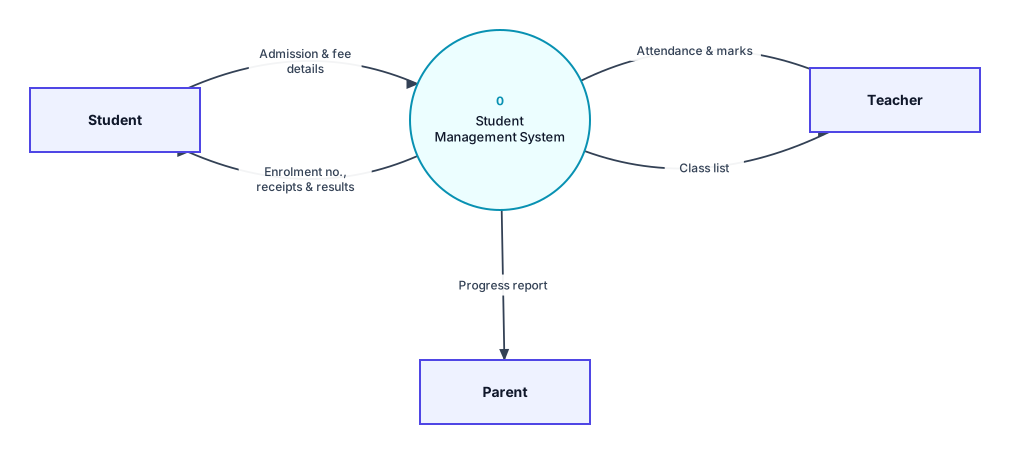
Context diagram for the student management system: the whole system as process 0, with its external entities.
External entities
- Student: Submits the admission form and fees, and receives an enrolment number, fee receipts and results.
- Teacher: Receives class lists and enters attendance and marks.
- Parent: Receives the student's progress report.
Data flows in the context diagram
| From | To | Data flow |
|---|---|---|
| Student | 0 Student Management System | Admission & fee details |
| 0 Student Management System | Student | Enrolment no., receipts & results |
| Teacher | 0 Student Management System | Attendance & marks |
| 0 Student Management System | Teacher | Class list |
| 0 Student Management System | Parent | Progress report |
Level 1 DFD
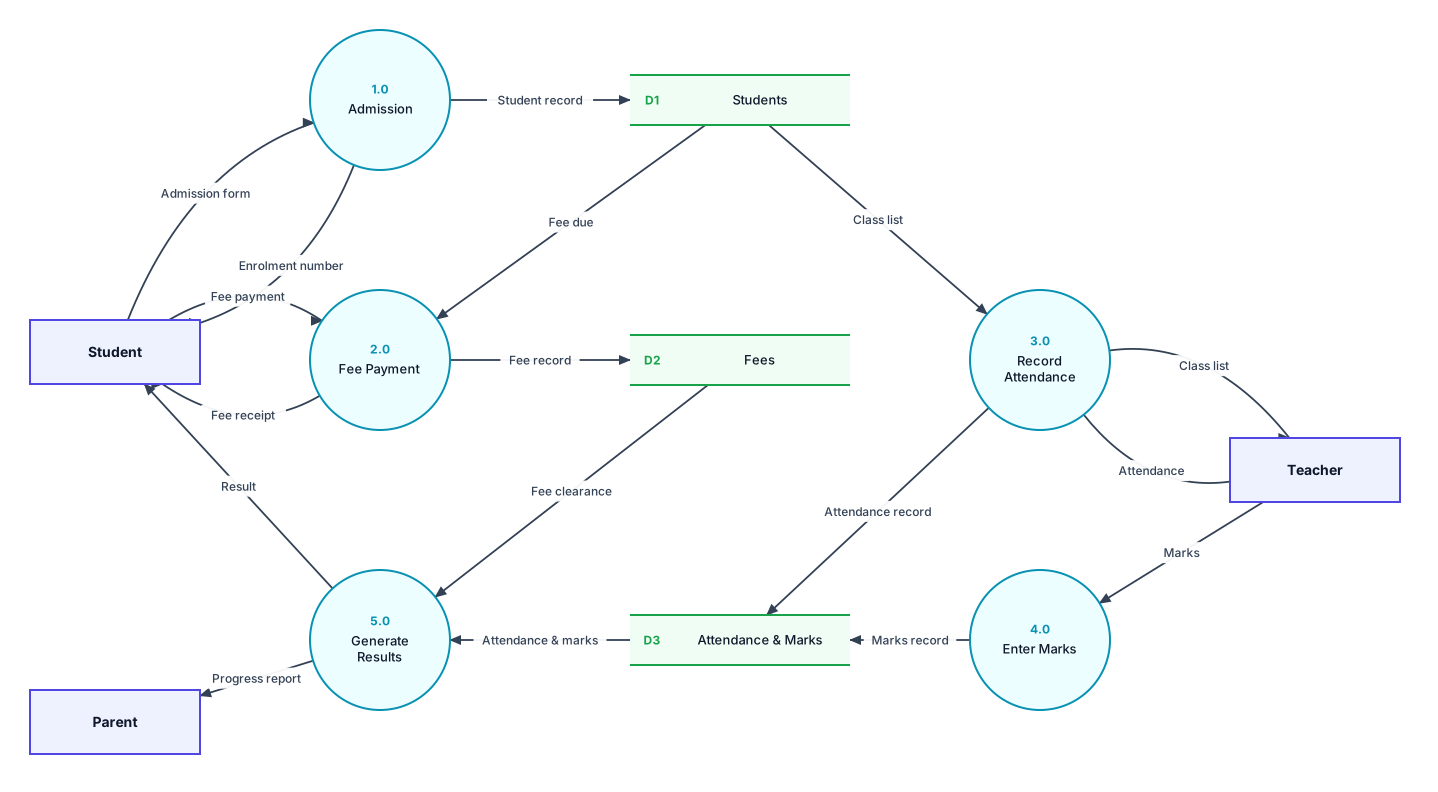
Level 1 DFD: process 0 broken into its main processes, with the data stores they use.
Processes
| Process | What it does |
|---|---|
| 1.0 Admission | Saves the admission form as a student record and issues an enrolment number. |
| 2.0 Fee Payment | Checks the fee due, records the payment and issues a receipt. |
| 3.0 Record Attendance | Sends the class list to the teacher and saves attendance. |
| 4.0 Enter Marks | Saves the marks entered by the teacher. |
| 5.0 Generate Results | Uses attendance, marks and fee clearance to produce results and progress reports. |
Data stores
- D1 Students: Student profiles and enrolment details.
- D2 Fees: Fee payments and dues.
- D3 Attendance & Marks: Attendance and exam marks for each student.
All data flows in the Level 1 DFD
| From | To | Data flow |
|---|---|---|
| Student | 1.0 Admission | Admission form |
| 1.0 Admission | D1 Students | Student record |
| 1.0 Admission | Student | Enrolment number |
| Student | 2.0 Fee Payment | Fee payment |
| D1 Students | 2.0 Fee Payment | Fee due |
| 2.0 Fee Payment | D2 Fees | Fee record |
| 2.0 Fee Payment | Student | Fee receipt |
| Teacher | 3.0 Record Attendance | Attendance |
| 3.0 Record Attendance | D3 Attendance & Marks | Attendance record |
| Teacher | 4.0 Enter Marks | Marks |
| 4.0 Enter Marks | D3 Attendance & Marks | Marks record |
| D3 Attendance & Marks | 5.0 Generate Results | Attendance & marks |
| D2 Fees | 5.0 Generate Results | Fee clearance |
| 5.0 Generate Results | Student | Result |
| 5.0 Generate Results | Parent | Progress report |
| D1 Students | 3.0 Record Attendance | Class list |
| 3.0 Record Attendance | Teacher | Class list |
Is it balanced?
Yes. Every external entity in the context diagram also appears in the Level 1 DFD, and the data going in and out matches. For example, the flows to and from Student in the context diagram are split into more specific flows on Level 1. Both diagrams also pass DrawDFD's rule checker, with no black holes, miracles or unused data stores.
Tips for your project
- Timetable, library and hostel modules are common additions. Add them as new processes rather than making one huge process.
- Keep “Generate Results” as one process at Level 1. Its calculation steps belong in a Level 2 DFD.
More DFD examples
Ready to draw your DFD?
Open the free editor. No sign-up, and you can start from any example.