An online shopping system (e-commerce website) is a popular project topic because it has several outside parties: customers, sellers, a payment gateway and a courier. Its DFD shows how orders and payments move between them.
Below you'll find the context diagram (Level 0) and the Level 1 DFD, with every entity, process, data store and data flow explained. Open either one in the editor to change it for your own project.
Context diagram (Level 0)
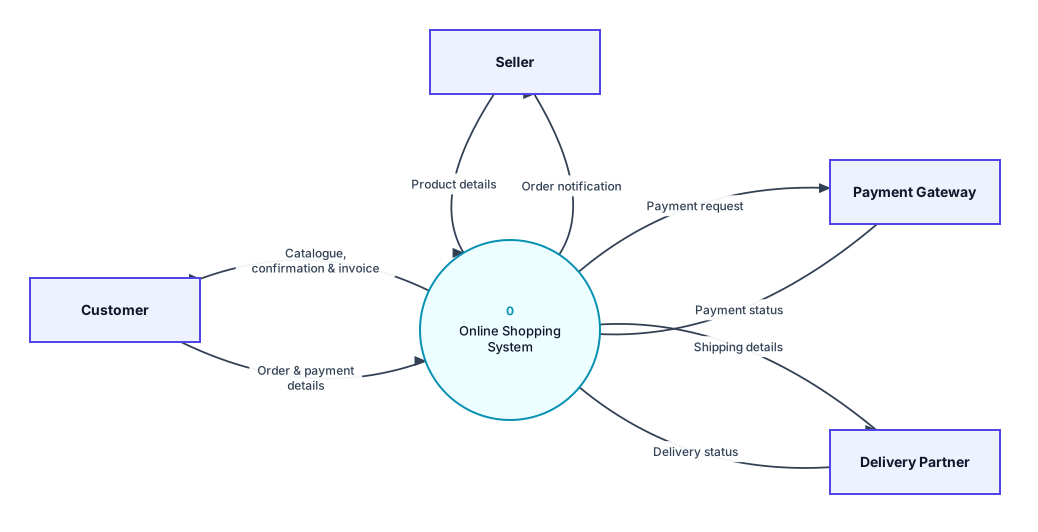
Context diagram for the online shopping system: the whole system as process 0, with its external entities.
External entities
- Customer: Browses products, places orders, pays and receives confirmations and invoices.
- Seller: Adds product details and receives order notifications.
- Payment Gateway: Processes online payments (UPI, cards, net banking) and returns the payment status.
- Delivery Partner: Receives shipping details and sends back delivery status.
Data flows in the context diagram
| From | To | Data flow |
|---|---|---|
| Customer | 0 Online Shopping System | Order & payment details |
| 0 Online Shopping System | Customer | Catalogue, confirmation & invoice |
| Seller | 0 Online Shopping System | Product details |
| 0 Online Shopping System | Seller | Order notification |
| 0 Online Shopping System | Payment Gateway | Payment request |
| Payment Gateway | 0 Online Shopping System | Payment status |
| 0 Online Shopping System | Delivery Partner | Shipping details |
| Delivery Partner | 0 Online Shopping System | Delivery status |
Level 1 DFD
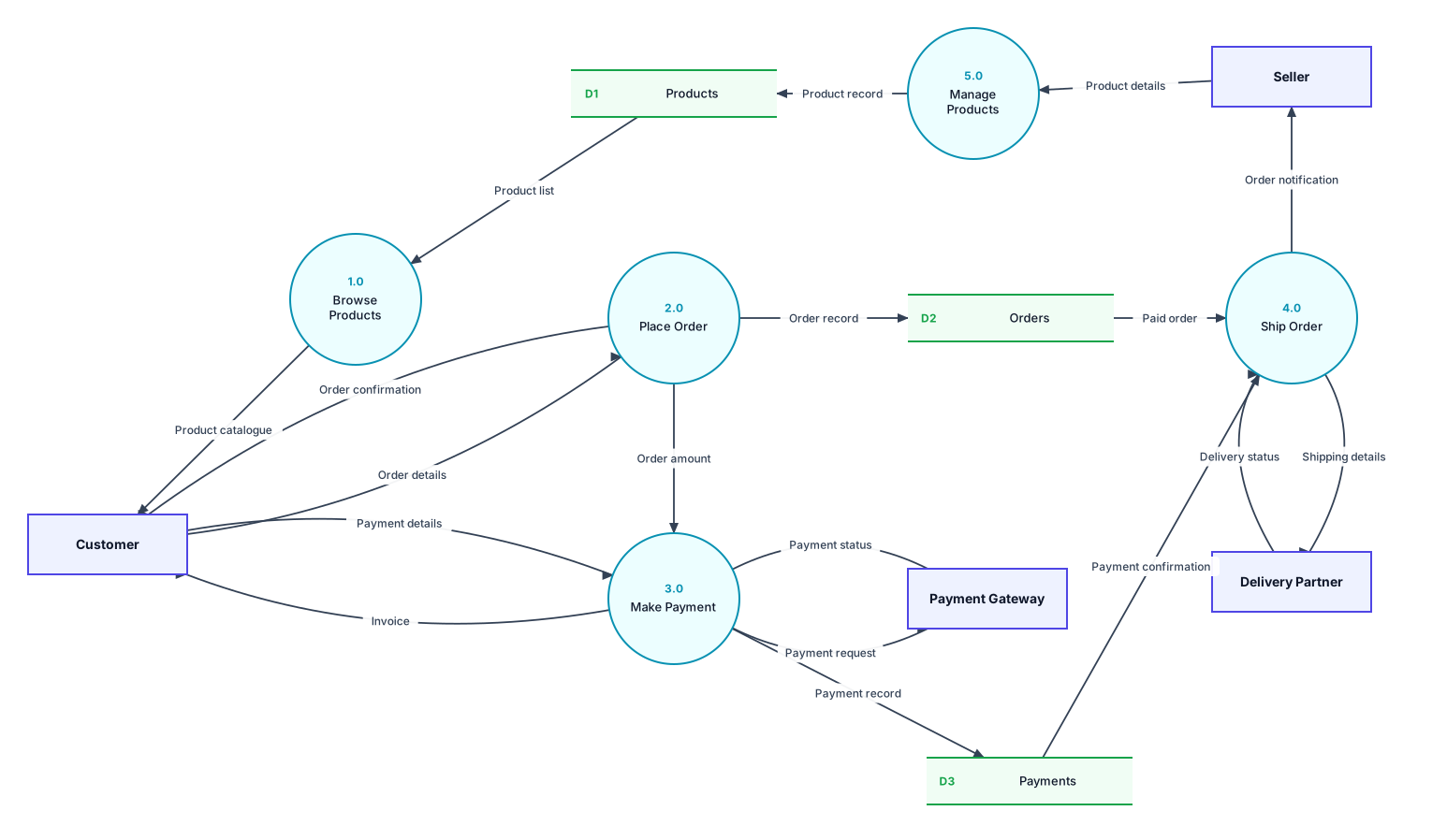
Level 1 DFD: process 0 broken into its main processes, with the data stores they use.
Processes
| Process | What it does |
|---|---|
| 1.0 Browse Products | Shows the product catalogue from the products store. |
| 2.0 Place Order | Records the order, confirms it to the customer and passes the amount to payment. |
| 3.0 Make Payment | Sends the payment request to the gateway, records the payment and issues the invoice. |
| 4.0 Ship Order | Ships paid orders through the delivery partner and notifies the seller. |
| 5.0 Manage Products | Saves product details from sellers. |
Data stores
- D1 Products: Product catalogue, prices and stock.
- D2 Orders: Every order and its status.
- D3 Payments: Payment records and confirmations.
All data flows in the Level 1 DFD
| From | To | Data flow |
|---|---|---|
| Seller | 5.0 Manage Products | Product details |
| 5.0 Manage Products | D1 Products | Product record |
| D1 Products | 1.0 Browse Products | Product list |
| 1.0 Browse Products | Customer | Product catalogue |
| Customer | 2.0 Place Order | Order details |
| 2.0 Place Order | D2 Orders | Order record |
| 2.0 Place Order | Customer | Order confirmation |
| 2.0 Place Order | 3.0 Make Payment | Order amount |
| Customer | 3.0 Make Payment | Payment details |
| 3.0 Make Payment | Payment Gateway | Payment request |
| Payment Gateway | 3.0 Make Payment | Payment status |
| 3.0 Make Payment | D3 Payments | Payment record |
| 3.0 Make Payment | Customer | Invoice |
| D2 Orders | 4.0 Ship Order | Paid order |
| D3 Payments | 4.0 Ship Order | Payment confirmation |
| 4.0 Ship Order | Delivery Partner | Shipping details |
| Delivery Partner | 4.0 Ship Order | Delivery status |
| 4.0 Ship Order | Seller | Order notification |
Is it balanced?
Yes. Every external entity in the context diagram also appears in the Level 1 DFD, and the data going in and out matches. For example, the flows to and from Customer in the context diagram are split into more specific flows on Level 1. Both diagrams also pass DrawDFD's rule checker, with no black holes, miracles or unused data stores.
Tips for your project
- Cart, returns and reviews are common extra processes. Add a Cart data store if you model 2.0 in a Level 2 DFD.
- An Admin entity that approves sellers is another common extension. Remember to balance it with the context diagram.
More DFD examples
Ready to draw your DFD?
Open the free editor. No sign-up, and you can start from any example.