A hospital management system (HMS) handles patient registration, appointments, consultations, lab tests and billing. The DFD shows how patient data moves between reception, doctors, the laboratory and the billing desk.
Below you'll find the context diagram (Level 0) and the Level 1 DFD, with every entity, process, data store and data flow explained. Open either one in the editor to change it for your own project.
Context diagram (Level 0)
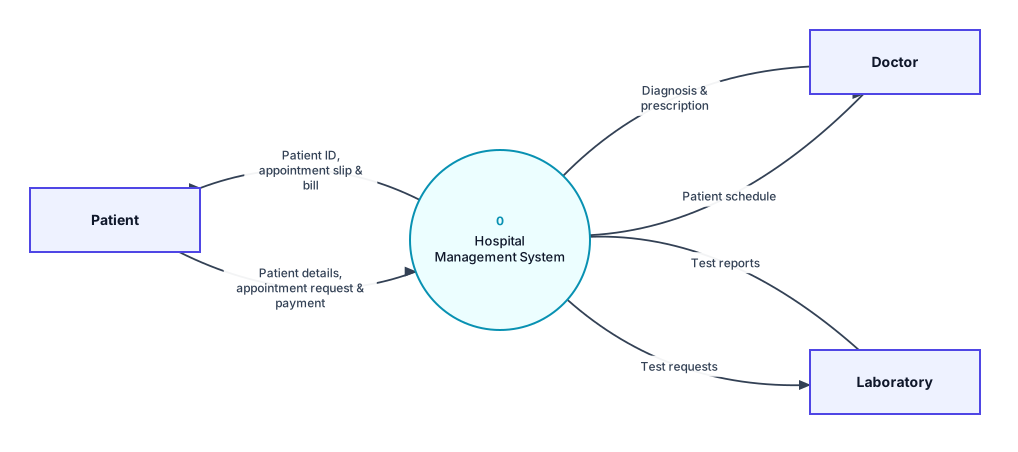
Context diagram for the hospital management system: the whole system as process 0, with its external entities.
External entities
- Patient: Gives personal details, requests appointments, pays bills and receives an ID, appointment slip and bill.
- Doctor: Receives the day's patient schedule and records the diagnosis and prescription.
- Laboratory: Receives test requests and sends back test reports.
Data flows in the context diagram
| From | To | Data flow |
|---|---|---|
| Patient | 0 Hospital Management System | Patient details, appointment request & payment |
| 0 Hospital Management System | Patient | Patient ID, appointment slip & bill |
| Doctor | 0 Hospital Management System | Diagnosis & prescription |
| 0 Hospital Management System | Doctor | Patient schedule |
| 0 Hospital Management System | Laboratory | Test requests |
| Laboratory | 0 Hospital Management System | Test reports |
Level 1 DFD
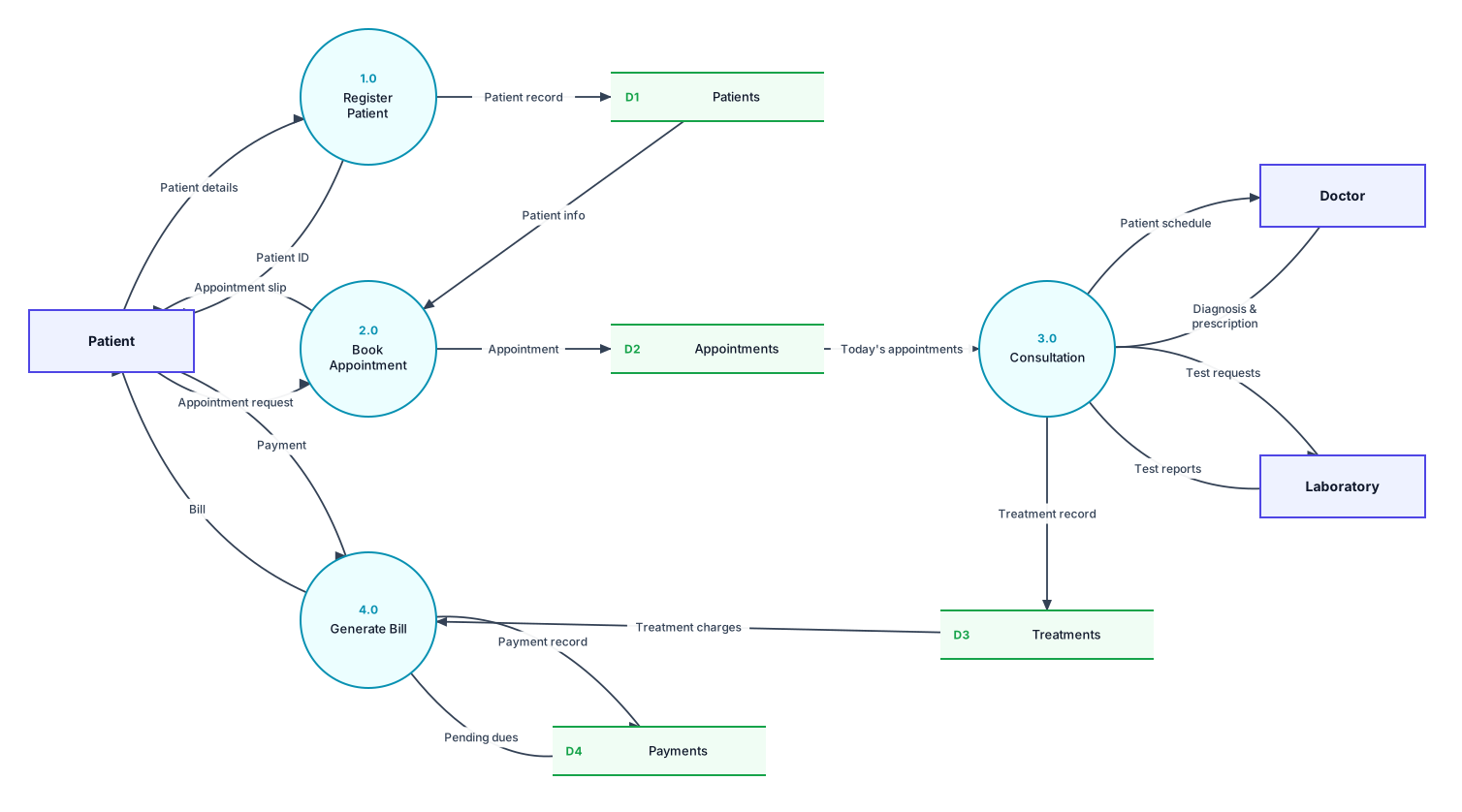
Level 1 DFD: process 0 broken into its main processes, with the data stores they use.
Processes
| Process | What it does |
|---|---|
| 1.0 Register Patient | Creates a patient record and gives the patient an ID. |
| 2.0 Book Appointment | Books an appointment slot and gives the patient an appointment slip. |
| 3.0 Consultation | Sends the schedule to the doctor, records the diagnosis and prescription, and handles lab tests. |
| 4.0 Generate Bill | Calculates charges from the treatment record, collects the payment and records it. |
Data stores
- D1 Patients: Patient personal and contact details.
- D2 Appointments: Booked appointments by date and doctor.
- D3 Treatments: Diagnosis, prescriptions and test results.
- D4 Payments: Bills, payments and pending dues.
All data flows in the Level 1 DFD
| From | To | Data flow |
|---|---|---|
| Patient | 1.0 Register Patient | Patient details |
| 1.0 Register Patient | D1 Patients | Patient record |
| 1.0 Register Patient | Patient | Patient ID |
| Patient | 2.0 Book Appointment | Appointment request |
| D1 Patients | 2.0 Book Appointment | Patient info |
| 2.0 Book Appointment | D2 Appointments | Appointment |
| 2.0 Book Appointment | Patient | Appointment slip |
| D2 Appointments | 3.0 Consultation | Today's appointments |
| 3.0 Consultation | Doctor | Patient schedule |
| Doctor | 3.0 Consultation | Diagnosis & prescription |
| 3.0 Consultation | Laboratory | Test requests |
| Laboratory | 3.0 Consultation | Test reports |
| 3.0 Consultation | D3 Treatments | Treatment record |
| D3 Treatments | 4.0 Generate Bill | Treatment charges |
| 4.0 Generate Bill | Patient | Bill |
| Patient | 4.0 Generate Bill | Payment |
| 4.0 Generate Bill | D4 Payments | Payment record |
| D4 Payments | 4.0 Generate Bill | Pending dues |
Is it balanced?
Yes. Every external entity in the context diagram also appears in the Level 1 DFD, and the data going in and out matches. For example, the flows to and from Patient in the context diagram are split into more specific flows on Level 1. Both diagrams also pass DrawDFD's rule checker, with no black holes, miracles or unused data stores.
Tips for your project
- Pharmacy and ward/bed management are common additions. Each can become a new process (for example 5.0 Dispense Medicine) with its own data store.
- If the lab is a department inside the hospital rather than an outside lab, you can model it as a process instead of an external entity.
More DFD examples
Ready to draw your DFD?
Open the free editor. No sign-up, and you can start from any example.