A library management system keeps track of members, books and every issue and return. It's one of the most popular DFD topics for BCA, MCA, B.Tech and diploma projects because the data flows are easy to follow.
Below you'll find the context diagram (Level 0) and the Level 1 DFD, with every entity, process, data store and data flow explained. Open either one in the editor to change it for your own project.
Context diagram (Level 0)
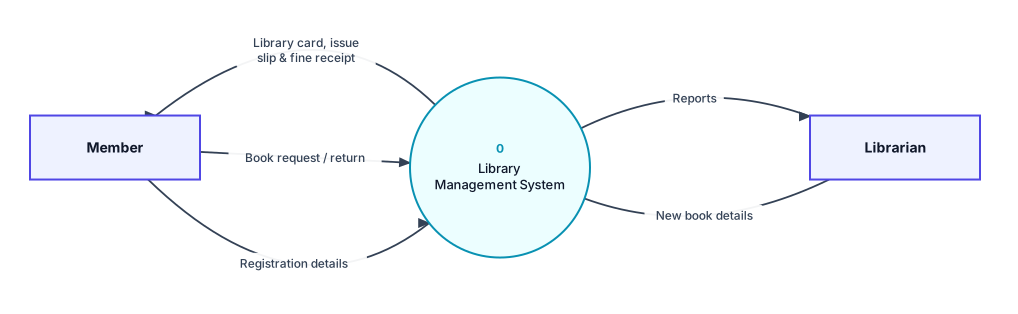
Context diagram for the library management system: the whole system as process 0, with its external entities.
External entities
- Member: Registers, requests and returns books, and receives the library card, issue slips and fine receipts.
- Librarian: Adds new books to the catalogue and receives reports on issues, returns and stock.
Data flows in the context diagram
| From | To | Data flow |
|---|---|---|
| Member | 0 Library Management System | Registration details |
| Member | 0 Library Management System | Book request / return |
| 0 Library Management System | Member | Library card, issue slip & fine receipt |
| Librarian | 0 Library Management System | New book details |
| 0 Library Management System | Librarian | Reports |
Level 1 DFD
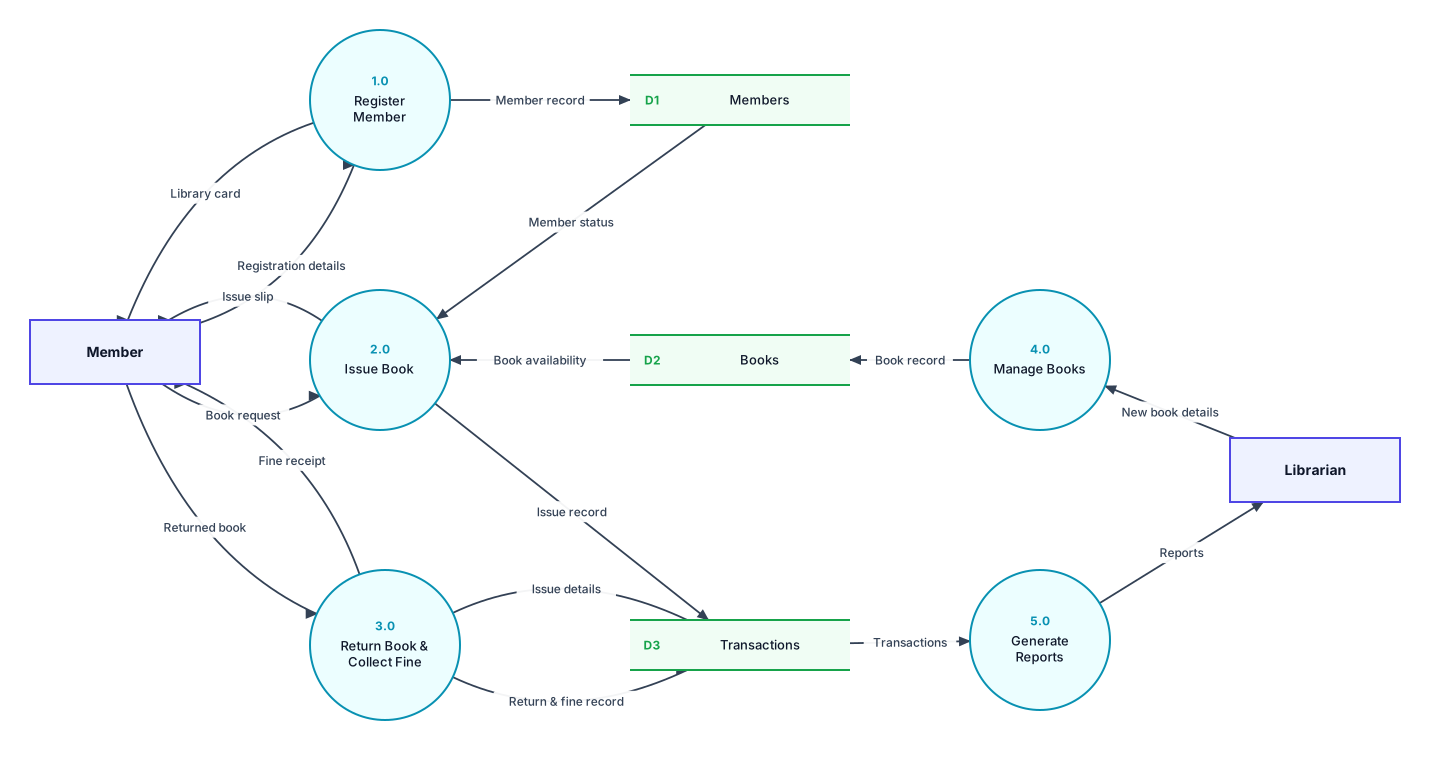
Level 1 DFD: process 0 broken into its main processes, with the data stores they use.
Processes
| Process | What it does |
|---|---|
| 1.0 Register Member | Checks the registration details, saves the member and issues a library card. |
| 2.0 Issue Book | Checks the member's status and book availability, then records the issue and prints an issue slip. |
| 3.0 Return Book & Collect Fine | Matches the returned book to its issue record, calculates any late fine and records the return. |
| 4.0 Manage Books | Adds or updates book records from the librarian. |
| 5.0 Generate Reports | Reads the transactions and produces reports for the librarian. |
Data stores
- D1 Members: Member details and membership status.
- D2 Books: Book catalogue and availability.
- D3 Transactions: Every issue, return and fine.
All data flows in the Level 1 DFD
| From | To | Data flow |
|---|---|---|
| Member | 1.0 Register Member | Registration details |
| 1.0 Register Member | D1 Members | Member record |
| 1.0 Register Member | Member | Library card |
| Member | 2.0 Issue Book | Book request |
| D1 Members | 2.0 Issue Book | Member status |
| D2 Books | 2.0 Issue Book | Book availability |
| 2.0 Issue Book | D3 Transactions | Issue record |
| 2.0 Issue Book | Member | Issue slip |
| Member | 3.0 Return Book & Collect Fine | Returned book |
| D3 Transactions | 3.0 Return Book & Collect Fine | Issue details |
| 3.0 Return Book & Collect Fine | D3 Transactions | Return & fine record |
| 3.0 Return Book & Collect Fine | Member | Fine receipt |
| Librarian | 4.0 Manage Books | New book details |
| 4.0 Manage Books | D2 Books | Book record |
| D3 Transactions | 5.0 Generate Reports | Transactions |
| 5.0 Generate Reports | Librarian | Reports |
Is it balanced?
Yes. Every external entity in the context diagram also appears in the Level 1 DFD, and the data going in and out matches. For example, the flows to and from Member in the context diagram are split into more specific flows on Level 1. Both diagrams also pass DrawDFD's rule checker, with no black holes, miracles or unused data stores.
Tips for your project
- Keep fine calculation inside 3.0 for a Level 1 DFD. If your teacher wants more detail, break 3.0 down in a Level 2 DFD (3.1 Check Return Date, 3.2 Calculate Fine, 3.3 Update Record).
- Some projects add an Admin entity who sets fine rates and library rules. If you add it, remember to add it to both the context diagram and the Level 1 DFD.
More DFD examples
Ready to draw your DFD?
Open the free editor. No sign-up, and you can start from any example.