The ATM system is a classic DFD example in software engineering courses. It's small but shows verification, transactions and communication with an outside bank server clearly.
Below you'll find the context diagram (Level 0) and the Level 1 DFD, with every entity, process, data store and data flow explained. Open either one in the editor to change it for your own project.
Context diagram (Level 0)
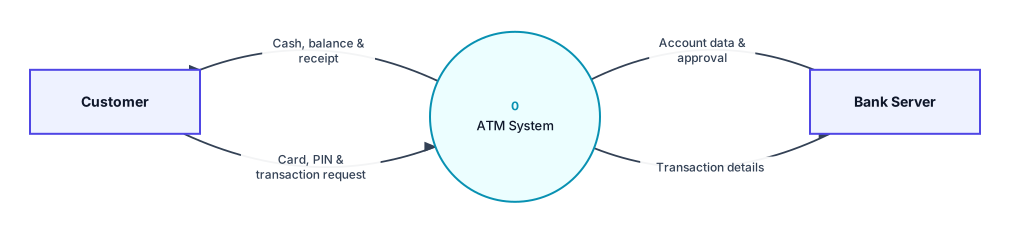
Context diagram for the atm system: the whole system as process 0, with its external entities.
External entities
- Customer: Inserts a card, enters a PIN, chooses a transaction, and receives cash, balance slips and receipts.
- Bank Server: The bank's core system. It supplies account and PIN data and receives transaction details.
Data flows in the context diagram
| From | To | Data flow |
|---|---|---|
| Customer | 0 ATM System | Card, PIN & transaction request |
| 0 ATM System | Customer | Cash, balance & receipt |
| 0 ATM System | Bank Server | Transaction details |
| Bank Server | 0 ATM System | Account data & approval |
Level 1 DFD
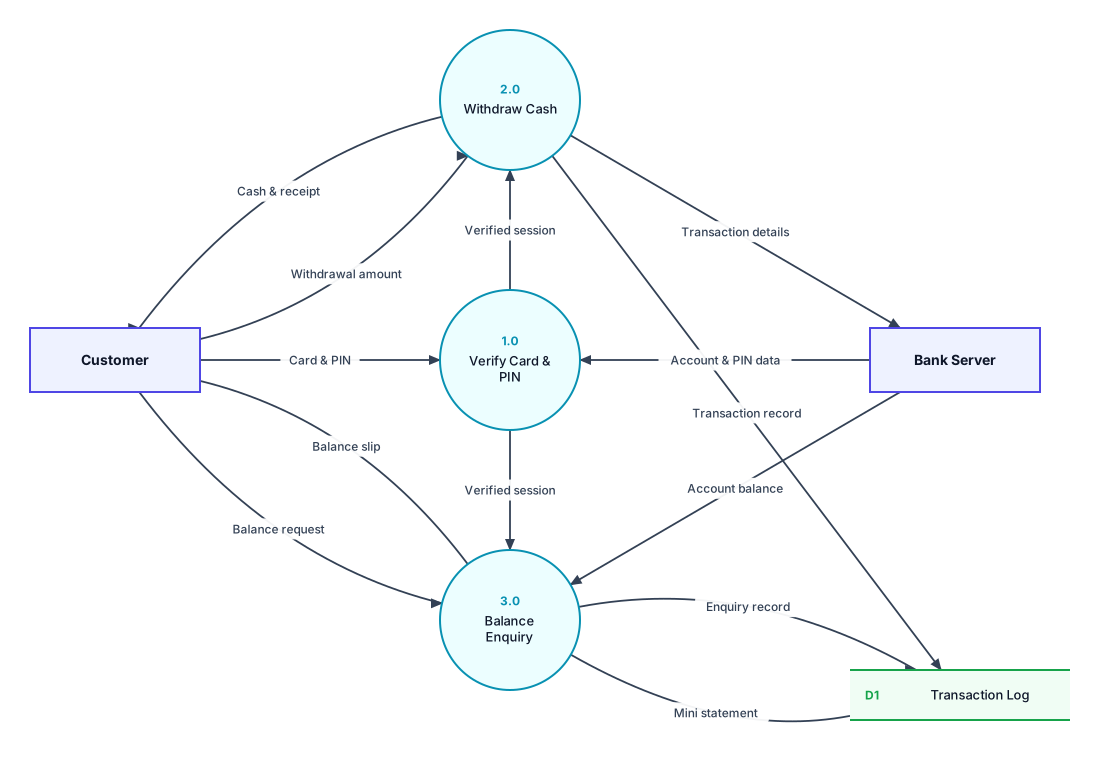
Level 1 DFD: process 0 broken into its main processes, with the data stores they use.
Processes
| Process | What it does |
|---|---|
| 1.0 Verify Card & PIN | Checks the card and PIN against the bank's data and starts a verified session. |
| 2.0 Withdraw Cash | Takes the amount, sends the transaction to the bank, dispenses cash and prints a receipt. |
| 3.0 Balance Enquiry | Gets the account balance from the bank and prints a balance slip with a mini statement. |
Data stores
- D1 Transaction Log: A record of every withdrawal and enquiry made at this ATM.
All data flows in the Level 1 DFD
| From | To | Data flow |
|---|---|---|
| Customer | 1.0 Verify Card & PIN | Card & PIN |
| Bank Server | 1.0 Verify Card & PIN | Account & PIN data |
| 1.0 Verify Card & PIN | 2.0 Withdraw Cash | Verified session |
| 1.0 Verify Card & PIN | 3.0 Balance Enquiry | Verified session |
| Customer | 2.0 Withdraw Cash | Withdrawal amount |
| 2.0 Withdraw Cash | Bank Server | Transaction details |
| 2.0 Withdraw Cash | Customer | Cash & receipt |
| 2.0 Withdraw Cash | D1 Transaction Log | Transaction record |
| Customer | 3.0 Balance Enquiry | Balance request |
| Bank Server | 3.0 Balance Enquiry | Account balance |
| 3.0 Balance Enquiry | Customer | Balance slip |
| 3.0 Balance Enquiry | D1 Transaction Log | Enquiry record |
| D1 Transaction Log | 3.0 Balance Enquiry | Mini statement |
Is it balanced?
Yes. Every external entity in the context diagram also appears in the Level 1 DFD, and the data going in and out matches. For example, the flows to and from Customer in the context diagram are split into more specific flows on Level 1. Both diagrams also pass DrawDFD's rule checker, with no black holes, miracles or unused data stores.
Tips for your project
- Account balances belong to the bank, so they come from the Bank Server entity rather than a data store inside the ATM system.
- Common extensions: 4.0 Deposit Cash, 5.0 Change PIN and 6.0 Fund Transfer.
More DFD examples
Ready to draw your DFD?
Open the free editor. No sign-up, and you can start from any example.